
What features are available on the Episoden conversation screen?
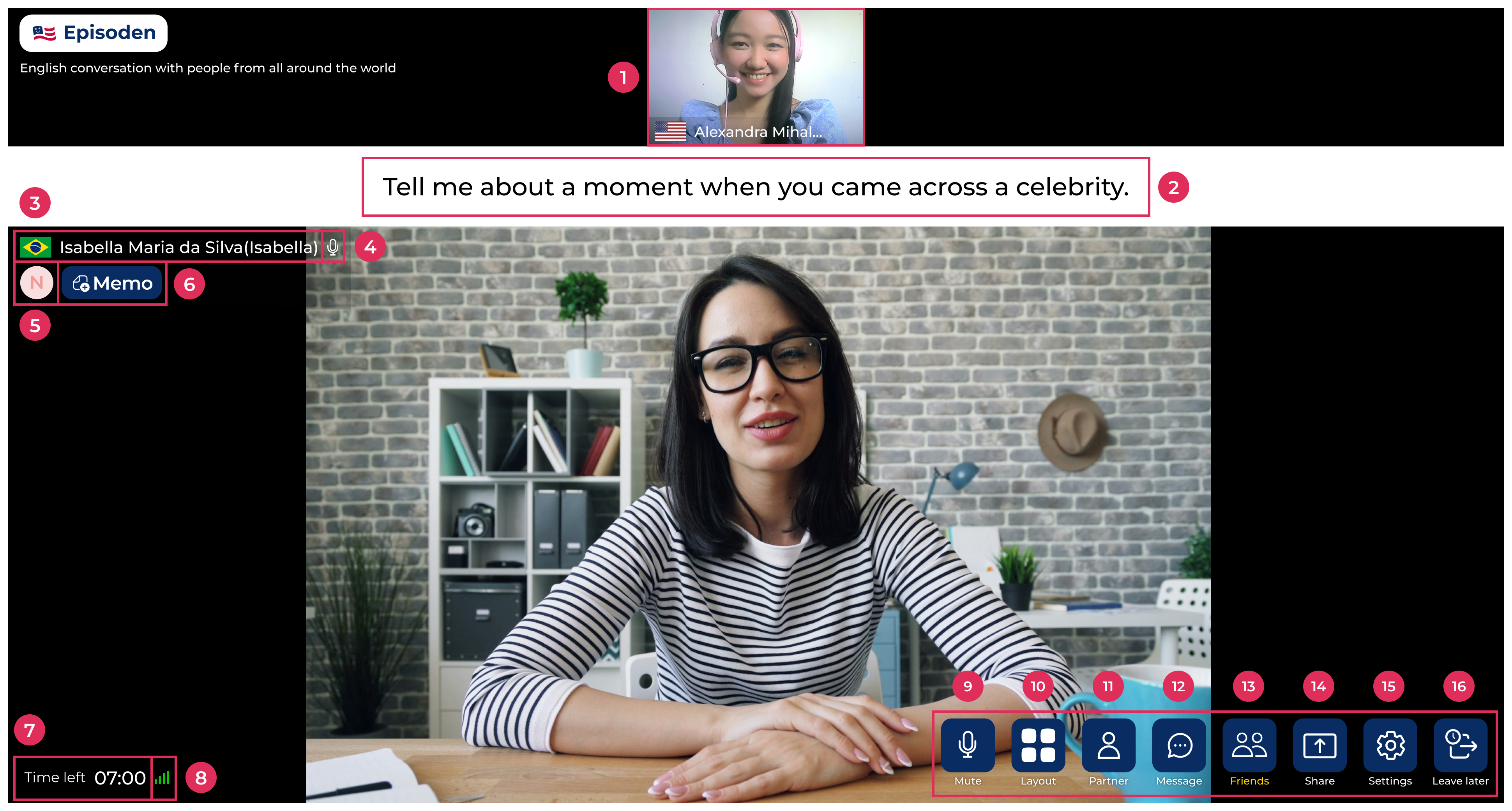
On the conversation screen, you'll find the following features:
- 1.Your video, country, name, and microphone status
- 2.Suggested conversation topics for the session
- 3.Your partner's flag and name
- 4.Your partner's microphone status
- 5.Shows how many times you've metN: New-face - First time meetingA: Acquaintance - Second time meetingF: Friend - Met 3 or more times
- 6.Memo: Memos you write about your partner (only visible to you)
- 7.Time left: Countdown showing the remaining session time
- 8.Network stability with your partner
- 9.Mute: Turn your microphone on or off
- 10.Layout: Choose between default, landscape, or portrait view
- 11.Partner: View your partner's country and profile description
- 12.Message: Chat feature
- 13.Friends: Check your Buddy list, Never Meet list, and match history
- 14.Share: Share your screen
- 15.Settings: Customize your background, and adjust your microphone and speaker
- 16.Leave later: Reserve an exit. After this session ends, you won't be connected to the next one